Best Video Formats for iPhone and Android
When choosing a video format for your smartphone, MP4 is the most reliable option due to its wide compatibility with both iPhone and Android devices. It offers small file sizes, excellent quality, and seamless playback. Other formats like MOV, MKV, and AVI have their own strengths but come with limitations:
- MP4: Works natively on iPhone and Android, supports H.264 and H.265 codecs, and is ideal for storage and streaming.
- MOV/M4V: Perfect for Apple devices, great for editing, but less Android-friendly.
- MKV: Best for archiving and multi-language content but requires third-party apps for playback.
- AVI: Outdated, large file sizes, and limited mobile support.
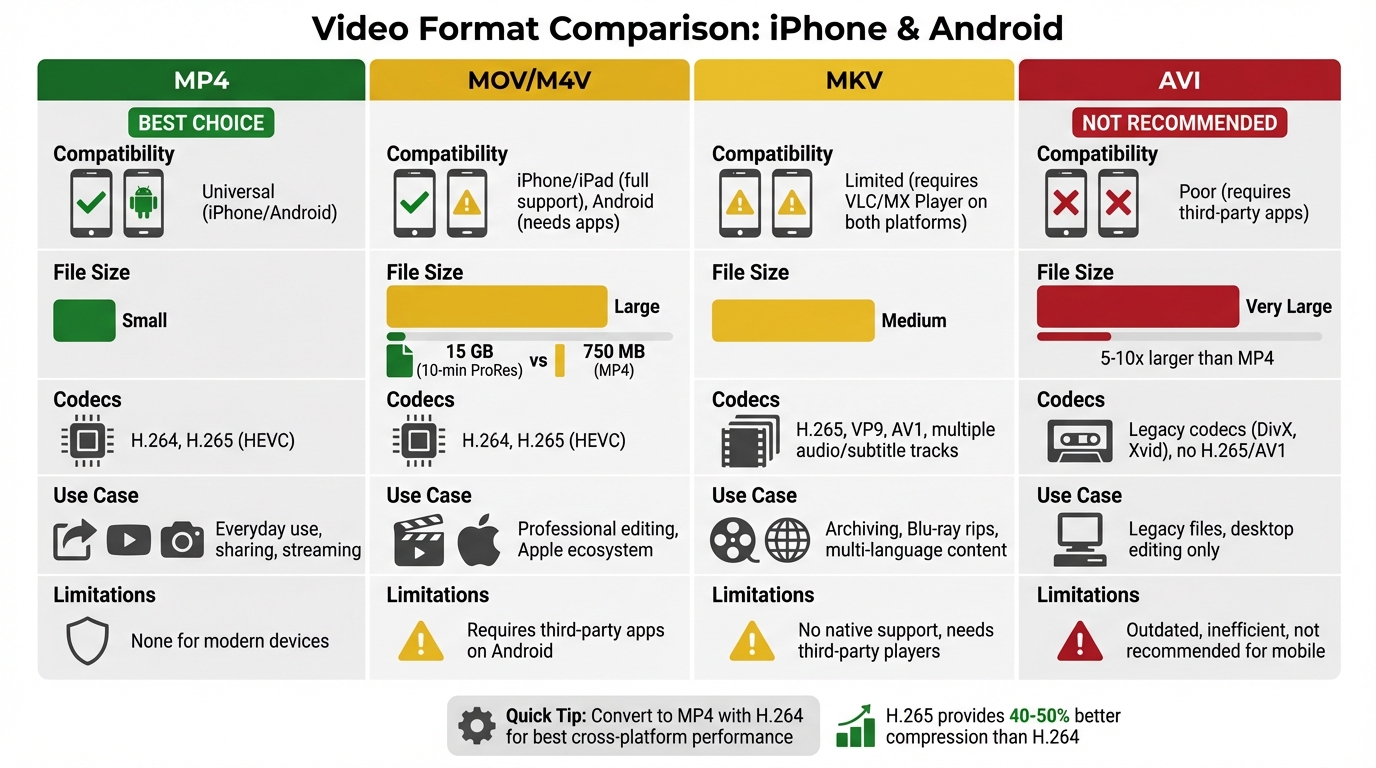
Quick Tip: Convert videos to MP4 with H.264 (or H.265 for newer devices) for the best cross-platform performance. Tools like ConvertHub make this process simple.
| Format | Compatibility | File Size | Use Case | Limitations |
|---|---|---|---|---|
| MP4 | Universal (iPhone/Android) | Small | Everyday use, sharing | None for modern devices |
| MOV/M4V | iPhone/iPad | Large | Editing, Apple ecosystem | Needs apps for Android playback |
| MKV | Limited (needs apps) | Medium | Archiving, subtitles | Requires third-party players |
| AVI | Poor (needs apps) | Very Large | Legacy files, editing | Outdated, inefficient |
To avoid playback issues, stick with MP4 for most scenarios, or convert MOV to MP4 for better compatibility. For advanced needs like editing or archiving, MOV or MKV might be better options.
Video Format Comparison for iPhone and Android Devices
1. MP4
Device Compatibility
MP4 is widely recognized as the go-to format for mobile devices, thanks to its native support on both iPhone and Android. Built-in media players can handle MP4 files effortlessly, making playback smooth and straightforward. The combination of H.264 video and AAC audio within an MP4 container ensures consistent performance across a variety of devices. This format is also the standard for major platforms like YouTube, Instagram, and TikTok, offering seamless integration for content creators and viewers alike.
Codec Support
The choice of codec plays a crucial role in playback quality and efficiency. H.264 (AVC) is a reliable option, offering hardware acceleration on nearly all modern devices. This ensures smooth playback while conserving battery life. For newer devices - like iPhone 7 and later or Android 5.0 and up - H.265 (HEVC) provides a significant advantage, delivering 40–50% better compression than H.264 without sacrificing visual quality. This makes it particularly suitable for 4K and HDR content. Additionally, Android 14 and newer versions now require AV1 codec support in MP4 containers, while Apple's iPhone 15 Pro models have also begun supporting this advanced format. To guarantee the widest compatibility, however, sticking with H.264/AAC remains a safe and effective choice.
File Size Efficiency
MP4's use of H.264 compression drastically reduces file sizes, making it a practical choice for both storage and streaming. For example, a one-minute 1080p video that would take up about 3 GB uncompressed can be reduced to just 50–80 MB with H.264 compression, or even further to 25–40 MB using H.265.
"HEVC can reduce file sizes by up to 50% for the same visual quality, making it indispensable for 4K and 8K content on modern smartphones".
This efficiency is achieved through lossy compression, which eliminates redundant visual data that the human eye is unlikely to detect. MP4 also supports variable bitrate (VBR), intelligently allocating more data to complex, high-motion scenes while using less for simpler ones.
Use Cases
For general use, combining H.264 video with AAC audio is ideal for maximum compatibility, especially when uploading or sharing videos on social media. If you're dealing with 4K content or need to save storage space, H.265 (HEVC) is a better option - provided your audience uses devices released after 2016. When uploading videos to the web or social platforms, enabling "Fast Start" (which places metadata at the start of the file) ensures that playback can begin immediately, even before the entire file has downloaded. Let’s move on to explore the pros and cons of different formats in more detail.
sbb-itb-ba72479
2. MOV/M4V
Device Compatibility
MOV and M4V are formats developed by Apple, making them a perfect match for iOS devices like iPhones and iPads. They work seamlessly with the built-in Photos app and QuickTime Player. However, things get trickier for Android users. While Android devices can handle the codecs inside these files (like H.264, HEVC, and AAC), they often don't natively support the MOV or M4V file containers. To play these formats on Android, you'll likely need third-party apps like VLC or MX Player. That said, some high-end Android models, such as the Samsung Galaxy S23 and Galaxy Z Fold 5, do list M4V as a supported format. This highlights the varying compatibility between platforms.
Codec Support
The MOV and M4V formats use the same core codecs as MP4, primarily H.264 and H.265 (HEVC). On iOS, both codecs are fully supported, with HEVC compatibility starting from the iPhone 7 onward. What sets M4V apart is its specific design for iTunes content, often including FairPlay DRM protection. This DRM restricts playback to authorized Apple devices and accounts, making M4V more specialized compared to MOV.
File Size Efficiency
When it comes to file size, MOV files tend to be much larger because they use high-bitrate, minimally compressed video. For instance, a 10-minute MOV video using Apple ProRes can take up around 15 GB, whereas the same video compressed with H.264 in an MP4 format would be about 750 MB. M4V, on the other hand, offers better compression and keeps file sizes small without sacrificing much quality. MOV’s larger file sizes are ideal for professional video editing, while M4V’s smaller sizes make it better suited for everyday viewing and sharing.
Use Cases
If you're editing videos on a Mac or using professional tools like Final Cut Pro, MOV is the go-to format because it maintains top-tier quality during editing. M4V, however, is designed for iTunes movies and DRM-protected content within Apple's ecosystem. If you need to share videos across platforms, converting MOV files to MP4 is a smart move. This ensures compatibility with Android devices without requiring extra apps and also speeds up upload times. Interestingly, since MOV and MP4 share the same base standard, you can sometimes simply change a .mov file extension to .mp4 for non-Apple playback - provided the file doesn’t include Apple-specific metadata or DRM.
3. MKV
Device Compatibility
MKV stands out for its advanced features, making it a popular choice for media archiving. However, it lacks the universal compatibility of MP4 or the Apple-specific optimization of MOV/M4V. For iPhone users, native support isn’t available, so apps like VLC or Infuse are necessary. On Android, while some devices - like certain Samsung models - support MKV files out of the box, others require third-party players such as VLC or MX Player for playback.
Codec Support
One of MKV’s strengths is its ability to handle almost any codec, including H.265, VP9, and AV1. This container format can also bundle multiple audio, video, and subtitle tracks efficiently, with only 1–2% overhead. Starting with Android 12, H.265 (HEVC) received standard support, with partial compatibility dating back to Android 5.0. MKV’s flexibility in managing multiple subtitle tracks and formats like ASS/SSA makes it a go-to option for those who need advanced subtitle handling - something MP4 struggles to provide.
File Size Efficiency
While MKV files are incredibly versatile, they tend to be larger than MP4 files. This is due to their support for extra features like multiple audio tracks, subtitles, and metadata attachments. Although the MKV container itself adds just 1–2% overhead, the inclusion of additional tracks and lossless audio can significantly inflate file sizes.
Use Cases
MKV is perfect for archiving high-quality media, such as Blu-ray rips or DVDs. As Sydney Butler from How-To Geek puts it:
"Matroska Video (MKV) is an open source format that's great for backups of media like DVDs because it supports multiple audio tracks, subtitles, and even multiple video streams".
For everyday mobile use, however, MKV’s complexity can be a drawback. Converting MKV files to MP4 is often recommended for smoother playback, especially on mobile devices. If your MKV file uses the H.264 codec, you can remux it into an MP4 container in seconds without re-encoding - just copy the existing streams. On iPhone, you can transfer MKV files using VLC’s "WiFi Upload" feature or save them to the Files app and open them in a compatible player. For consistent performance on mobile devices, converting MKV to MP4 is often the best solution.
4. AVI
Device Compatibility
AVI, or Audio Video Interleave, is a legacy video format developed by Microsoft back in 1992. While it was groundbreaking at the time, it struggles to keep up with modern mobile environments. Neither iPhones nor Android devices natively support AVI files in their default video players. If you try to open an AVI file on these devices, you'll likely encounter an "Unable to Play Video" error. To play AVI files, you'll need to rely on third-party media players like VLC Media Player, MX Player, or Infuse 6.
Codec Support
AVI acts as a container for a variety of video and audio codecs. While this may sound versatile, it often leads to compatibility headaches. The format doesn’t support modern, high-efficiency codecs like H.265 (HEVC) or AV1, which are essential for smooth playback on most smartphones. Even if your media player recognizes the AVI format, playback may fail if the specific codec inside - such as older ones like DivX or Xvid - isn’t supported by your device’s software or hardware. Additionally, AVI’s compression methods are outdated, making it far less efficient than newer formats.
File Size Efficiency
One of AVI’s biggest drawbacks is its massive file size. Videos in this format can be 5 to 10 times larger than equivalent MP4 files. This lack of efficient compression makes AVI files impractical for mobile devices, where storage space is often limited. AVI also performs poorly when it comes to web streaming, further highlighting its limitations compared to modern formats like MP4.
Use Cases
AVI’s utility today is mostly confined to specific scenarios. It’s still used in professional video editing and archival storage on desktop systems, where maintaining uncompressed or lossless quality outweighs concerns about file size. You might also come across AVI files when downloading older movies or TV shows from the internet. However, for mobile devices, converting AVI files to MP4 (using H.264/AAC codecs) is highly recommended. This conversion not only ensures compatibility but can also reduce file sizes by up to 90% without sacrificing quality.
How to Change iPhone Video Format to Most Compatible (HEIF/HEVC to JPeg & H.264)
Pros and Cons
When it comes to mobile video playback, each format offers its own set of strengths and weaknesses. Here's a closer look:
MP4 is the go-to format for mobile devices, thanks to its compatibility with both iPhone and Android. It delivers excellent compression, making it efficient for storage and streaming. However, its lossy compression means some quality is sacrificed compared to formats used in professional settings.
MOV is a favorite for professional editing, offering high-quality video. The downside? It creates much larger files and often requires third-party apps for playback on Android devices.
MKV stands out for its versatility. It supports multiple audio tracks and subtitles, making it perfect for archival purposes or multi-language content. The catch is that it usually requires additional apps for smooth playback, as mentioned earlier.
AVI can store lossless video, preserving top-notch quality. But for mobile use, it’s largely outdated due to its massive file sizes and limited support on modern devices.
For 4K streaming, H.265 within an MP4 container is a game-changer. It compresses video up to 50% more efficiently than H.264, making it ideal for high-resolution content. However, only about 85% of devices released after 2016 support its hardware decoding, which can limit its practicality .
These comparisons underscore the importance of choosing the right format. The decision can significantly impact playback quality, storage needs, and compatibility. Carefully weighing these factors is crucial before diving into video converter tools to ensure smooth, cross-platform performance.
How to Convert Videos for Cross-Platform Playback
ConvertHub makes video conversion simple with just three steps: drag and drop your video file, select MP4 as the output format, and download your converted file instantly. It supports over 800 file formats, including popular ones like MOV, MKV, AVI, and WMV, making it a versatile tool for all your video needs.
For those optimizing videos for mobile devices, ConvertHub offers device-specific presets. These presets automatically adjust resolution and quality settings, ensuring your videos look great on any screen size - whether it's a phone or tablet. If you're juggling multiple files, premium subscribers ($9/month) can take advantage of batch processing to convert several videos at once.
Security is a top priority for ConvertHub. The platform uses 256-bit encryption, enforces a zero-access policy, and automatically deletes files after 24 hours. Free users can convert files up to 100 MB with one conversion per day, while premium users enjoy the ability to handle files up to 2 GB with unlimited conversions.
Users have praised the platform for its reliability and ease of use.
"I highly recommend giving ConvertHub a go. Used it in one of my recent projects and it works really well!" - Stefan Rows, Developer
ConvertHub is entirely browser-based, so there's no need to install any software. You can access it on desktops, tablets, or smartphones, making it incredibly convenient. With over 40,000 files converted and a 99.9% uptime rate, the platform serves more than 500 users daily with dependable performance.
Conclusion
MP4 stands out as the go-to format for universal compatibility, with full support across modern devices and browsers. Its combination of H.264 video and AAC audio ensures smooth playback on both iPhone and Android, making it a reliable choice for seamless video performance across platforms.
For iPhone users, MOV and M4V are excellent alternatives, offering support for professional-grade codecs and features tailored to Apple devices.
Android users may find MKV and AVI more versatile. MKV, in particular, shines with its open-source design, allowing multiple audio tracks, subtitles, and chapters within a single file - ideal for high-quality movie backups.
To optimize playback across devices, consider these technical adjustments:
- Enable "Fast Start" to allow videos to begin playing before the full file downloads.
- Use Variable Bitrate (VBR) encoding to maintain quality while reducing file size.
- For 1080p video, aim for a bitrate between 5–8 Mbps, as going higher rarely improves visible quality.
"Convert incompatible files to MP4 with H.264 video and AAC audio for best device support." - Urquhart1244, Apple Community
FAQs
Should I use H.264 or H.265 for MP4 on my phone?
For MP4 videos, H.264 is the go-to codec for seamless playback on both iPhone and Android devices. Its widespread support ensures your videos will run smoothly across almost all platforms. On the other hand, H.265 (HEVC) provides improved compression, meaning smaller file sizes and better quality, but it’s not as universally compatible - especially on older devices.
If you need maximum compatibility, stick with H.264. However, if your device supports H.265 and you’re working with 4K videos or want to save storage space, it’s worth considering.
Why won’t my phone play MOV, MKV, or AVI files?
Your phone may struggle to play MOV, MKV, or AVI files because these formats often rely on codecs or containers that aren’t supported by your device’s default media player. This mismatch can cause playback issues. A simple fix? Convert the video to a format like MP4, which is widely compatible with both iPhone and Android devices.
What MP4 settings work best for sharing and streaming?
When it comes to sharing and streaming MP4 files, the ideal settings involve using the H.264 or H.265 codecs. These codecs strike a good balance between maintaining quality and keeping file sizes manageable. To ensure smooth playback, select a resolution and bitrate that align with the requirements of your target platform. This approach helps ensure your content works seamlessly across devices such as iPhones and Android smartphones.