
File Conversion Security: 7 Things You Need to Know
Online file conversion services can be risky if you don't take proper precautions. Cybercriminals often exploit these platforms to steal sensitive data or infect devices with malware. Here’s a quick guide to staying safe:
- Use platforms with 256-bit encryption to protect your data during transfers.
- Verify automatic file deletion policies to ensure your files aren’t stored unnecessarily.
- Check for GDPR or privacy compliance to confirm the service follows strict data protection standards.
- Avoid registration requirements to minimize sharing personal information.
- Scan all downloaded files with antivirus software to detect potential threats.
- Read privacy policies carefully to understand how your data is handled.
- Choose services with proven security records backed by certifications like ISO 27001 or SOC 2.
These steps can help protect your files and personal information from cyber threats. For highly sensitive data, consider using offline tools or on-premises solutions instead of online converters.
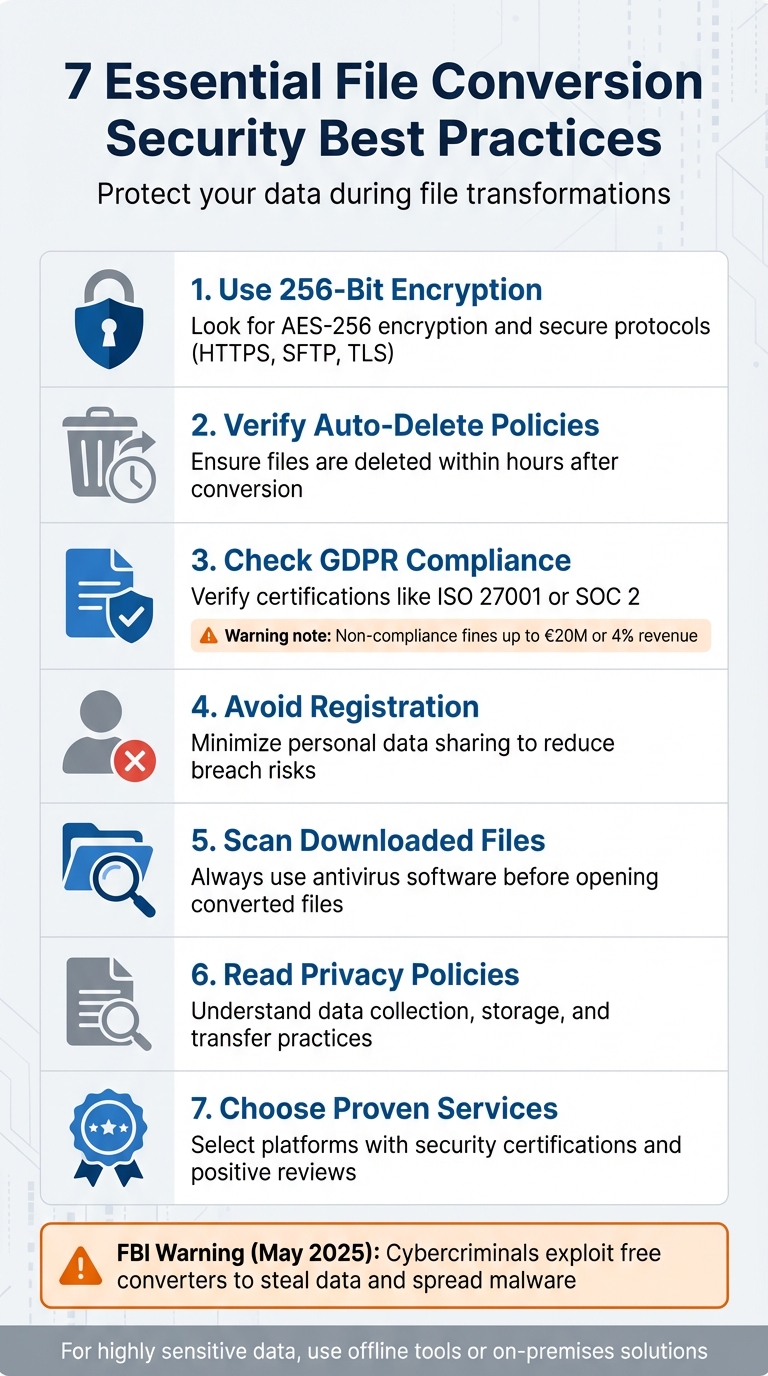
7 Essential File Conversion Security Best Practices
1. Use Platforms with 256-Bit Encryption
Encryption Strength
When it comes to protecting files during conversion, 256-bit encryption sets the gold standard. This level of encryption ensures that even if someone intercepts your data during transfer, it remains completely unreadable to unauthorized individuals. Platforms using AES-256 encryption convert your files into a secure, scrambled format that only authorized systems can decode.
Before choosing a service, check for clear documentation confirming the use of AES-256 encryption. Reliable platforms also integrate secure transfer protocols like HTTPS, SFTP, and TLS to add extra layers of protection. For instance, ConvertHub employs 256-bit encryption to safeguard your data at every stage - from the moment you upload a file to when you download the converted version.
Strong encryption doesn’t just protect your data; it also plays a critical role in meeting compliance requirements.
Compliance with Data Protection Standards
Encryption is just one piece of the puzzle. A platform’s adherence to regulatory standards like GDPR, HIPAA, or PCI DSS demonstrates its commitment to data security. Many trustworthy services go a step further by earning certifications such as ISO 27001 or SOC 2, which validate their compliance with top-tier security frameworks. These certifications provide additional assurance that your data is being handled with care and in accordance with strict security protocols.
2. Check Automatic File Deletion Policies
Privacy Policy Transparency
While encryption ensures your file content remains secure, clear file deletion policies are equally important for protecting your data. These policies dictate how long a service retains your files on their servers after processing. Without specific guidelines, your files could be stored indefinitely, increasing the risk of unauthorized access. Unfortunately, many online converters fail to provide clarity about their file storage practices.
"When you upload a file to an online converter, you can never be sure that the site won't save a copy of your file for its own purposes." - Kaspersky
To minimize risks, always check the service's privacy policy. Look for platforms that delete files promptly - ideally within hours of conversion. For instance, ConvertHub ensures files are erased automatically right after processing.
It's also worth noting that in May 2025, the FBI highlighted cases where cybercriminals exploited free online converters to steal data and spread malware.
If a service lacks transparency or clear deletion practices, steer clear. Never upload sensitive files to platforms that don't explicitly outline their data handling and deletion policies.
3. Confirm GDPR and Privacy Compliance
Compliance with Data Protection Standards
Protecting your data is non-negotiable. When you use a file conversion service, you're entrusting it with potentially sensitive information. If the service doesn't adhere to regulations like the GDPR (General Data Protection Regulation), your data could be mishandled, improperly stored, or even shared without your consent. GDPR serves as a critical foundation for ensuring data security and privacy.
Non-compliance with GDPR can lead to hefty fines - up to €20 million (around $21 million) or 4% of a company’s global revenue. These penalties exist to safeguard personal data and emphasize the importance of following the law.
"Legal websites must also comply with the General Data Protection Regulation (GDPR) if they handle data belonging to EU citizens." - Legal Desire
To further assess a service’s commitment to security, check for certifications like ISO 27001 or SOC 2. These certifications indicate that the service meets established security and privacy standards. Additionally, take the time to review the platform’s privacy policy. This will clarify how your data is managed - whether it’s collected, stored, or even where the servers are located. Services that are vague or lack transparency about their data practices should be approached with caution.
If your data is especially sensitive, consider using secure desktop software or on-premises solutions. These options provide greater control over data handling and are often better aligned with industry regulations.
Ensuring GDPR compliance and verifying these measures is just as essential as checking for encryption or deletion policies to keep your data safe during the conversion process.
4. Look for No-Registration Options
Privacy Policy Transparency
Keep your personal data safe by avoiding unnecessary sharing. When a service requires registration, it often means handing over personal details like your email address, name, or even payment information. This increases your vulnerability to data breaches, phishing attempts, or misuse of your information. Be cautious of platforms that demand extensive personal data or payment for basic file conversions - these could be phishing schemes designed to exploit your trust. Platforms focused on security prioritize minimizing the data they collect.
"If you still plan to use an online converter, look for one that doesn't require registration, and never give it your payment details." - Kaspersky
No-registration options help protect your privacy. Using a file converter that doesn’t require an account means you’re not leaving behind a trail of personal information. This is especially critical when working with sensitive documents. The fewer times your data interacts with third-party servers, the lower the risk of it being stored, shared, or compromised.
For instance, ConvertHub offers a free plan that lets you convert one file per day without requiring registration. This eliminates unnecessary data sharing. Additionally, their paid plans enhance security with features like automatic file deletion and 256-bit encryption, ensuring your data stays protected.
5. Scan Downloaded Files with Antivirus Software
Malware and Virus Protection Measures
File converters can be a hotbed for malicious activity, with cybercriminals embedding harmful code, scripts, or Trojans into converted files. The FBI has highlighted this issue, warning that even tools that appear trustworthy can be manipulated to steal sensitive information or compromise your device's security. These hidden threats can lead to severe consequences for your personal and digital safety.
"Another common risk is malware infection. Some dubious converter sites may modify your files or add malicious code to the converted file - and without antivirus protection, threats remain undetected." - Kaspersky
The damage from infected files can be extensive. They can trigger ransomware attacks, enable unauthorized financial transactions, or expose sensitive data like Social Security numbers, banking information, and passwords. If you skip scanning files before opening them, you're leaving your security to chance.
To protect yourself, always scan downloaded files with up-to-date antivirus software before accessing them. Be particularly wary of files delivered in password-protected archives, as this is a common trick to hide viruses from security tools. Taking this extra step can save you from a world of trouble.
sbb-itb-ba72479
6. Read Privacy Policies Before Converting
Privacy Policy Transparency
When it comes to file conversion services, encryption and deletion practices are just part of the equation. You also need to dive into their privacy policy to understand how your data is handled. A good privacy policy should clearly explain whether your files are collected, stored, or transferred, and if so, for how long they remain on the service's servers. Unfortunately, many converters fail to provide these details, leaving users in the dark about their data's fate.
"Review the online converter's privacy policy to understand how your data will be handled. Make sure the service does not collect, store, or transfer information without your consent - or at least claims not to." - Kaspersky
Even if a policy seems straightforward, don’t assume it covers everything. Look for explicit statements that your data won’t be collected, stored, or shared without your permission. Another critical point is whether the service specifies automatic file deletion timelines. If there's no mention of how long files remain on their servers or if they retain copies for internal use, consider it a warning sign.
Beyond clarity, the privacy policy should also confirm the service complies with data protection regulations, ensuring your files are handled responsibly.
Compliance with Data Protection Standards
For sensitive files, regulatory compliance isn’t just a bonus - it’s a necessity. Check whether the service mentions adherence to key standards. For instance, legal document conversions should align with American Bar Association (ABA) guidelines, while healthcare-related files must meet HIPAA requirements. If these details are vague or entirely absent, it’s a strong indication that your data might not be as secure as you’d hope.
Taking the time to examine these policies ties back to the broader goal: ensuring every step of the file conversion process prioritizes your security and privacy. Missing or unclear compliance details should raise immediate concerns, especially when dealing with confidential information.
7. Choose Services with Proven Security Records
Reputation and Transparency
Before committing to a platform, take time to explore its reputation. User reviews and industry feedback can offer valuable insights into its transparency and security track record. Seek out services that clearly explain their security protocols, data handling practices, and server locations. This level of openness isn't just a bonus - it's a key sign of reliability.
It's also worth digging into the service's history. How have they handled past security incidents or vulnerabilities? A strong response to issues can be just as telling as avoiding breaches in the first place. Additionally, consider the technical safeguards the service employs to protect your data.
Compliance with Data Protection Standards
Certifications can serve as a seal of approval for a service's security practices. Look for credentials like ISO 27001 or SOC 2, which show that the service adheres to widely recognized security standards and undergoes regular audits. These certifications are a good starting point when assessing a platform's commitment to protecting your data.
Beyond certifications, examine other security measures. A reliable service should have secure access controls in place to ensure only authorized users can access files. Monitoring conversion activities adds another layer of oversight, keeping a detailed record of who accessed what. Also, check that the platform uses secure connections (HTTPS) and encrypted transfer methods like SFTP or FTPS for handling uploads. Together, these measures create a robust defense to safeguard your files.
System Update #317: FBI Warning: Your Free File Converter Could Cost You Everything
Conclusion
File conversion involves several steps, each of which can introduce potential security risks. As Kaspersky points out, "When you upload a file to an online converter, you can never be sure that the site won't save a copy of your file for its own purposes. Uploaded data can easily end up in the hands of scammers, and even be used to launch an attack on your company."
To keep your data safe during the conversion process, consider these precautions: use 256-bit encryption, ensure files are promptly deleted after use, look for GDPR-compliant services, opt for no-registration tools, and run antivirus scans. These measures create a solid safety net for your files.
However, online converters can’t promise complete confidentiality. Avoid using them for highly sensitive information. For critical documents, desktop-based software or on-premises solutions are better options, as they allow you to maintain full control over your data. If you must use online tools, take extra steps to protect yourself, such as enabling Incognito mode, using a VPN, and stripping metadata from files before uploading.
The FBI has issued warnings about the risks associated with online file processing. By adopting these practices, you not only shield your files but also uphold privacy and compliance standards. Safeguarding your data requires effort, but it’s a necessary step to maintain its integrity during every stage of the conversion process.
FAQs
What makes 256-bit encryption important for secure file conversions?
When it comes to secure file conversions, 256-bit encryption stands out as a top-tier safeguard. This encryption method employs advanced cryptographic algorithms to shield your data, creating a barrier so strong that unauthorized access or decryption becomes virtually impossible during the conversion process.
Using 256-bit encryption ensures your files are protected against potential breaches, keeping sensitive information safe and private. It also helps you meet privacy standards, making it a dependable choice for maintaining data security throughout the file conversion journey.
Why is it important for online file conversion services to comply with GDPR?
Ensuring GDPR compliance is a must for online file conversion services. It guarantees that personal data is managed securely and responsibly, which is especially important when handling information belonging to EU citizens. This compliance not only safeguards sensitive data from breaches or unauthorized access but also reflects a commitment to privacy.
Failing to comply with GDPR can result in hefty legal penalties and a loss of user trust. By meeting these standards, file conversion services show they prioritize data security, giving users confidence and peace of mind when they upload their files.
What are the potential risks of using file converters that require you to register?
Using file converters that require you to register can come with some serious risks. These include data breaches, where your private information could be leaked, identity theft, if your personal details end up in the wrong hands, and malware infections, especially if the platform is insecure or intentionally harmful.
To protect yourself, always double-check the reliability of the tool you plan to use. Opt for platforms that have robust security features, transparent privacy policies, and a solid reputation. Only share personal details if absolutely necessary, and make sure the website uses a secure connection (look for 'https' in the URL).