
How to Choose the Right File Conversion API
Want to simplify file conversions? A File Conversion API can save you time by automating transformations between hundreds of file formats like PDFs, images, videos, and more. But not all APIs are the same. Here's how to pick the best one for your business:
- Define Needs: List the file formats your workflows require and test for accuracy, especially with complex files.
- Integration: Check for SDKs in your preferred programming language (e.g., Python, PHP) or connectors for tools like Zapier.
- Scalability: Ensure the API supports your file volume, size (up to 2GB), and processing needs (synchronous or asynchronous).
- Security: Look for encryption (AES-256), GDPR compliance, and short file retention policies (e.g., 3 hours or in-memory processing).
- Pricing: Match pricing models (subscriptions, pay-as-you-go) to your usage. Understand credit systems and file size costs.
- Support: Prioritize APIs with clear documentation, SDKs, and responsive technical support.
Pro Tip: Test APIs like ConvertHub, which supports 800+ formats, offers 50 free calls, and boasts 99.9% uptime. Always trial with your actual workflows to ensure it meets your needs.
Tutorial #1: How to use the API of online-convert.com - Introduction
Define Your File Conversion Requirements
Before diving into the search for a file conversion API, take a step back and outline your business needs. Think about the types of files you work with every day, how they move through your systems, and the volume you expect to handle. Skipping this step could lead to picking an API that either lacks key features or ends up costing more than necessary.
Identify Required File Formats and Conversions
Start by listing all the file formats your business uses. While common formats like PDF, DOCX, XLSX, and PNG might cover the basics, many businesses also rely on more specialized formats like CAD drawings (AutoCAD), e-books (EPUB, MOBI), or even older OpenOffice files. If your documents include complex elements - such as charts, bookmarks, headers, or footers - you’ll need an API capable of high-fidelity conversion to ensure nothing gets lost in the process.
To be sure, run tests with your most intricate internal documents. This will help you verify the API can preserve all structural elements and metadata. You might also want to look for additional features like OCR for scanned documents, watermarking, file compression, or tools for redacting sensitive data. Once you’ve nailed down format requirements, think about how the API will integrate into your existing workflow.
Determine Workflow and Integration Requirements
Check how well the API aligns with your current tech stack. Look for official SDKs in programming languages your team uses, such as PHP, Python, Node.js, Ruby, Java, .NET, Go, or Swift. This can save time during integration. If your team leans toward no-code tools, confirm that the API offers connectors for platforms like Zapier, Make.com, or n8n.
Decide whether you need synchronous processing for quick, user-facing results or asynchronous processing for handling large batches or heavy files. If your files are stored in cloud services like AWS S3, Cloudflare R2, Google Cloud Storage, or Azure Blob Storage, make sure the API can directly interact with these services to avoid unnecessary steps. Once integration is sorted, consider how the API will scale with your needs.
Estimate Scalability and Usage Volume
Think about how many files you’ll be processing each month to choose the right pricing tier. If you’re dealing with thousands of files daily, you’ll need an API that can handle high volumes without hitting rate limits. Also, check the maximum file size allowed - some APIs support files up to 2GB using chunked uploads, while others restrict sizes to 200MB or even just 3.5MB on basic plans.
For high-volume operations, use webhooks to get real-time notifications when a file is processed, instead of constantly polling the API. Test the API’s speed with average-sized files to ensure it meets your latency needs. Lastly, if your business handles sensitive data, confirm the provider offers automatic file deletion, typically within three hours, to maintain data privacy and reduce storage overhead.
Evaluate Key Features and Capabilities
When choosing an API, it's essential to analyze its features to ensure they meet your operational needs. This includes assessing format compatibility, automation tools, and the quality of conversions. Let’s dive into what to look for in format support, automation, and performance.
Format Support Coverage
The range of formats an API can handle is a dealbreaker for many businesses. High-quality APIs typically support between 200 and 800+ format pairs, covering documents, images, audio, video, e-books, archives, and fonts. For instance, ConvertHub supports over 800 format pairs, reducing the risk of running into unsupported files.
Pay attention to industry-specific formats. If your business requires long-term document storage, ensure the API supports PDF/A. Engineering firms should check for features like exporting AutoCAD drawings to PDF while retaining layers. For email-heavy workflows, confirm the API can extract attachments or convert emails directly to PDF.
"With support for over 800 format pairs, this API covers every use case. Great documentation and it works perfectly." - Csaba Kissi, csabakissi.com
Look beyond simple format-to-format conversions. Advanced APIs often offer features like template-based generation (e.g., transforming JSON data into formatted PDFs or DOCX files), metadata extraction, and document redaction for sensitive information. However, note that ConvertHub currently lacks OCR capabilities, so if optical character recognition is crucial for your workflow, you may need an additional tool.
Ease of Use and Automation Features
Automation plays a big role in enhancing team efficiency. Features like batch processing allow you to convert multiple files simultaneously and download them as a single ZIP archive. Another time-saver is URL-based conversions, where you can pass a file link instead of uploading files manually.
For large-scale operations, seamless integration is key. Webhooks are particularly useful, as they provide real-time notifications when a conversion is complete, eliminating the need for constant status checks. If your files are stored in cloud platforms like AWS S3, Cloudflare R2, or Azure Blob Storage, check if the API integrates directly with these services to streamline file handling.
Some APIs allow you to bundle multiple actions - such as converting files, adding watermarks, and generating thumbnails - into a single call. Additionally, official SDKs in popular programming languages like PHP, Python, Node.js, Ruby, Java, .NET, Go, and Swift can significantly simplify integration.
"ConvertHub API saved us hours of manual processing. The integration was easy and the format coverage is impressive." - Petar Ivanov, petarivanov.tech
For large files, confirm the API supports chunked uploads to avoid interruptions. Lastly, evaluate both the speed and precision of conversions to ensure the API can handle your business's demands.
Performance and Conversion Accuracy
Speed is essential, but accuracy matters even more. Test the API with complex documents - those containing charts, bookmarks, annotations, headers, footers, and custom fonts - to ensure it preserves critical elements. A quick conversion is useless if it compromises key details.
Evaluate processing speeds. Top-tier APIs can handle simple files in under a second. For larger or more complex tasks, asynchronous processing is a must to avoid bottlenecks in your application.
Reliability is another critical factor. Check the service level agreement (SLA) for uptime guarantees. Enterprise-grade APIs typically promise 99.9% to 99.95% uptime, translating to less than nine hours of downtime annually. ConvertHub, for example, offers a 99.9% uptime guarantee. Also, review rate limits and ensure the API provides clear error messages and robust error handling mechanisms.
Assess Security and Compliance
When dealing with file conversions through an API, security isn't optional - it's a necessity. Every document passing through your system must be safeguarded, from the moment it leaves your environment to its deletion from the provider's servers. A secure API ensures peace of mind and protects sensitive business information.
Data Encryption and Privacy Standards
Prioritize APIs that use TLS 1.2+ for encrypting data in transit and AES-256 for securing data at rest. These encryption standards help prevent unauthorized access and data breaches. Additionally, verify the provider's compliance credentials. For instance:
- ISO 27001 certification ensures a robust information security management system.
- GDPR compliance is essential if you're handling data for European customers.
- For healthcare-related data, a Business Associate Agreement (BAA) is mandatory to meet HIPAA requirements.
Also, ensure that your data is processed in jurisdictions that meet your compliance needs.
"Security is not just a feature of our service, it's the foundation on which we've built our entire platform." - ConvertHub Security Team
Encryption is just the first step. The next consideration is how the API handles file retention.
File Retention Policies
How long files are stored is just as important as how they’re protected. Many APIs automatically delete files after a set period, such as 3 hours. However, the most secure option is in-memory processing, where files are handled entirely in RAM and never written to disk. This approach leaves no residual data footprint.
For APIs that do write files, look for features like an immediate DELETE method for manual removal. Even better, choose APIs that integrate directly with your cloud storage (e.g., AWS S3, Azure Blob Storage, or Cloudflare R2) so converted files are sent directly to your infrastructure instead of being stored on the provider’s servers. Some providers take it a step further by restarting processing instances every 2 hours to clear any leftover data from memory.
With security and retention covered, the next priority is ensuring the system is dependable.
Reliability and Uptime Guarantees
A secure API is only useful if it’s consistently available. The best providers offer 99.9% uptime, minimizing disruptions. Review the provider's Maximum Tolerable Downtime (MTD) - this measures how quickly they can recover from a complete failure. Top-tier providers often restore critical services in under 4 hours.
For added assurance, choose APIs that provide 24/7 monitoring and undergo regular third-party security audits. These practices help identify and fix vulnerabilities before they become serious issues.
sbb-itb-ba72479
Compare Pricing Plans and Cost-Effectiveness
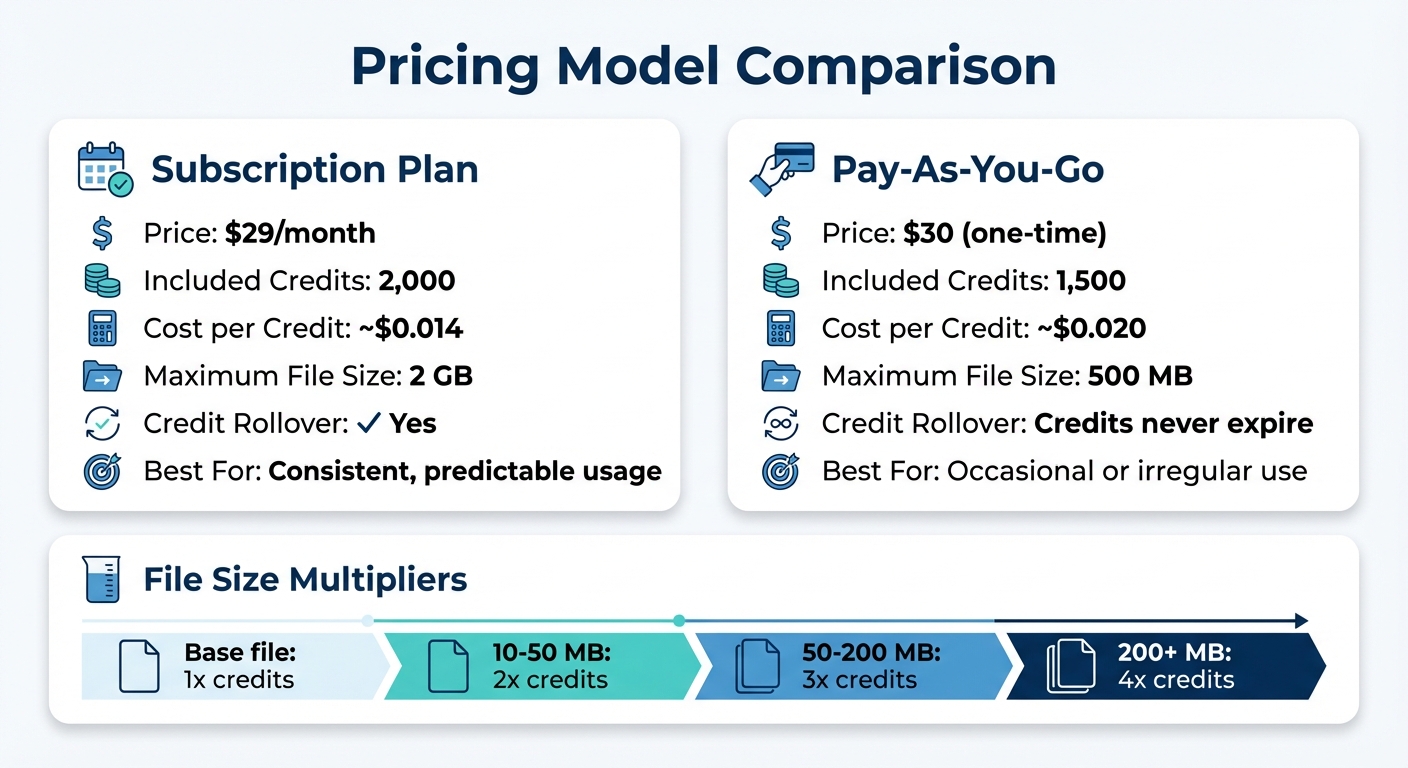
File Conversion API Pricing Comparison: Subscription vs Pay-As-You-Go
Once you've evaluated security, reliability, and performance, the next step is to figure out how much you're spending on conversions. File conversion APIs come with various pricing structures, and picking the right one can help you stay within budget while meeting your needs. Here's how to ensure your cost strategy aligns with your usage.
Understand Pricing Models
File conversion APIs generally offer three pricing options: monthly subscriptions, pay-as-you-go credits, and free tiers. Each serves different usage patterns:
- Monthly Subscriptions: Ideal for consistent, predictable use. For example, ConvertHub offers a subscription starting at $29 per month, which includes 2,000 credits (roughly $0.014 per credit). This plan also comes with credit rollover, meaning unused credits carry over to the next month.
- Pay-As-You-Go: Perfect for occasional or irregular use cases. ConvertHub's pay-as-you-go option lets you buy 1,500 credits for $30 (about $0.020 per credit). This is a good choice if you're experimenting or don't need regular conversions.
- Free Tiers: These plans let you test basic features with limited conversions at no cost, making them useful for evaluating the API's core functionality.
Keep in mind that the cost per conversion isn't always straightforward. A single file conversion might use multiple credits based on file size or complexity. For example, converting a PDF to plain text may cost 1 credit, while converting it to an Office format could use 3 credits.
Analyze Value for Scalability
If your needs grow over time, it's important to consider how well the pricing model scales. Generally, higher-tier subscription plans provide better value per credit compared to pay-as-you-go. However, other factors also come into play:
- File Size Multipliers: Credit usage increases with file size. For instance, converting a file that's 10–50 MB may use double the credits, files between 50–200 MB may use triple, and files over 200 MB could require quadruple the credits.
- Concurrency Limits: Entry-level plans often restrict you to converting one file at a time, while higher-tier plans might allow unlimited simultaneous conversions. This is especially important if you're handling large batch processes.
Cost-Benefit Analysis Table
Here's a quick comparison of subscription and pay-as-you-go options to help you decide:
| Feature | Subscription | Pay-As-You-Go |
|---|---|---|
| Price | $29/month | $30 (one-time purchase) |
| Included Credits | 2,000 | 1,500 |
| Cost per Credit | ~$0.014 per credit | ~$0.020 per credit |
| Maximum File Size | 2 GB | 500 MB |
| Credit Rollover | Yes | Credits never expire |
Test Usability and Developer Resources
When choosing a file conversion API, it’s not just about the technical specs or pricing. The ease of integration and the quality of developer support can make or break your experience. Before committing, take the time to test how smoothly the API integrates and whether the vendor provides the tools and resources your team requires. Good documentation and SDKs can save hours of development time, while poor resources can turn straightforward tasks into frustrating challenges.
Explore Documentation and SDKs
Clear and detailed documentation is essential for seamless integration. Look for API references that cover the essentials - authentication methods, error codes, and request examples. The best providers go a step further by offering SDKs tailored to popular programming languages like Node.js, Python, PHP, and .NET. Some even provide pre-built n8n automation workflows to streamline complex file processing tasks. These SDKs reduce boilerplate coding and speed up development.
Interactive tools can also simplify the process. For instance, ConvertHub’s White Label Starter Kit allows you to test conversions using a user-friendly interface. It even generates ready-to-use code snippets, so you don’t have to write initial code from scratch. Many vendors also provide Postman collections or OpenAPI specifications, which can be imported into your preferred tools for testing. If your project involves modern web applications, ensure the SDKs include TypeScript type definitions to catch errors early during development. Once you’ve examined the documentation, evaluate the support options available for troubleshooting.
Evaluate Support Channels
Reliable technical support is crucial for a smooth integration experience. Review the available support options - whether it’s through Discord, Slack, email, or live chat. It’s a good idea to reach out with technical questions before committing to a provider. Some vendors offer dedicated helpdesks or GitHub issue tracking for resolving issues. After confirming the support quality, focus on testing the API’s performance in real-world conditions.
Conduct Performance Benchmarks
Testing the API with sample files that reflect your typical workflow is a must. Many providers offer free trials - ConvertHub, for example, provides 50 API calls without requiring a credit card. Use these trial credits to evaluate key factors like conversion speed, accuracy, and how well the formatting is preserved. Pay attention to how credit usage scales with file size and complexity to estimate costs.
It’s also important to test error handling. Use invalid or complex inputs to see if the API returns clear error messages and status codes. For larger files, check if the API supports chunked uploads (up to 2 GB) and test asynchronous processing with webhook notifications to ensure reliability. This hands-on testing will give you a clear picture of whether the API can handle your production workload before you fully commit.
Conclusion: Making the Right Choice
Choosing the right API for your enterprise involves a series of thoughtful steps, from identifying your needs to thoroughly evaluating developer tools. By carefully blending technical, security, and pricing considerations, you can land on a solution that aligns with your business goals.
Start by confirming that the API supports all the format pairs your workflows depend on. It should also meet your security requirements, such as offering 256-bit encryption, GDPR compliance, and transparent file retention policies. Next, evaluate the technical resources. Opt for APIs that provide detailed documentation, official SDKs in your preferred programming language, and responsive support channels. A smooth integration process means your team can quickly roll out new features without unnecessary delays.
Pricing is another critical factor. Check that the cost structure aligns with your usage - whether you need a subscription for frequent, high-volume tasks or a pay-as-you-go model for occasional use.
For businesses needing extensive format support (over 800 format pairs), developer-friendly tools, and dependable infrastructure, ConvertHub's API is an option worth exploring. They even offer 50 free calls to help you test it out - no credit card required. Before finalizing, ensure the API fits seamlessly into your workflow by running a test with your specific use cases.
FAQs
How can I integrate the file conversion API with my existing system?
To integrate the ConvertHub file conversion API into your system, start by creating an API key through the ConvertHub portal. Make sure to store this key securely, as it will be essential for authentication. Next, select the SDK that aligns with your tech stack - whether it's PHP, JavaScript, or another supported language - and install it. Using the SDK will make it easier to handle requests and parse responses.
Once you've installed the SDK, configure it with your API key. Test the setup by performing a small file conversion to confirm everything is functioning correctly. After successful testing, replace the test logic with your actual file-handling processes. This might include uploading files from your storage system and managing the converted outputs.
To ensure smooth operation, enable logging to track performance and catch any errors. The API is built to handle scaling, so you can easily adjust its usage as your system's demands grow. This approach ensures a reliable and efficient integration into your workflow.
What security features should I prioritize when choosing a file conversion API?
When evaluating a file conversion API, it's essential to focus on features that prioritize the security of your data at every stage. Start by ensuring the API uses strong encryption technologies, like 256-bit SSL/TLS, to protect file uploads, conversions, and downloads. Additionally, end-to-end encryption is a must to safeguard your files throughout the entire process.
Look for a provider that enforces a zero-access policy, meaning files are processed automatically without human intervention. It's also important to verify the availability of data-retention controls, such as automatic file deletion within 24 hours or the ability to delete files on demand. These measures help prevent unnecessary storage of sensitive data. The API should run on a secure cloud infrastructure certified by standards like ISO 27001 and comply with privacy laws, such as GDPR, to ensure your data remains protected.
By focusing on encryption, strict access policies, fast file deletion, certified infrastructure, and adherence to privacy regulations, you can confidently choose an API that delivers enterprise-level security.
How do I choose the most cost-effective pricing plan for my file conversion needs?
To figure out the best pricing plan for your needs, start by estimating how many files you typically convert each month. Also, think about whether you’ll need extras like support for larger files or additional storage. ConvertHub gives you two choices: Subscription, which provides unlimited conversions and extra features, or Pay-as-You-Go, designed for occasional users.
If you’re converting more than 120 files a month, the Subscription plan - priced at $19/month or $9/month when billed annually - will likely save you money. On the other hand, if your usage is lower, Pay-as-You-Go credits might be the way to go. These credits never expire, so you only pay for what you use. Don’t forget the added perks of the Subscription plan, such as faster processing and support for larger files, which could make a big difference depending on your needs. By weighing your usage habits and the features you require, you can choose the plan that fits your workflow and budget perfectly.