
10 File Conversion API Use Cases for Developers
File conversion APIs simplify how developers handle file transformations, saving time and reducing complexity. Whether you're converting documents, optimizing images, or managing multimedia formats, these APIs streamline workflows with secure, scalable solutions. Here’s what you can do with them:
- Generate PDFs: Convert DOCX, XLSX, or images into PDFs for sharing or downloads.
- Optimize Images: Convert bulky formats (e.g., PNG, JPEG) into WebP or AVIF to improve web performance.
- Create Thumbnails: Generate JPG or PNG previews from PDFs and videos.
- Extract Text: Make files searchable by extracting text from PDFs, images, and e-books.
- Ensure Media Compatibility: Convert videos, audio, and images into platform-friendly formats.
- Archive Files: Standardize files (e.g., PDF, CSV) for compliance in regulated industries.
- Process Forms: Automate e-signature workflows by transforming forms into PDFs.
- Support Localization: Convert fonts, documents, and media for global audiences.
- Handle Bulk Processing: Manage high-volume file operations efficiently.
- Automate Developer Workflows: Simplify repetitive tasks like asset transformations or documentation generation.
Why Choose a File Conversion API?
Top platforms like ConvertHub offer over 800 format combinations, 99.9% uptime, and secure features like 256-bit SSL encryption and GDPR compliance. With integration options like SDKs, RESTful APIs, and automation tools (e.g., n8n, Zapier), developers can quickly adapt these APIs into existing systems.
Quick Comparison of Key Features:
| Feature | ConvertHub Highlights |
|---|---|
| Supported Formats | 800+ combinations (documents, images, videos) |
| File Size Limit | Up to 2GB with chunked uploads |
| Security | 256-bit SSL, GDPR-compliant |
| Integration | SDKs (PHP, JavaScript), REST API, No-code |
| Pricing | Starts at $9/month for 300 API calls |
Next Steps
Start with 50 free API calls (no credit card required) and explore how file conversion APIs can simplify your projects. Focus on secure integration, efficient workflows, and scaling your application with reliable tools like ConvertHub.
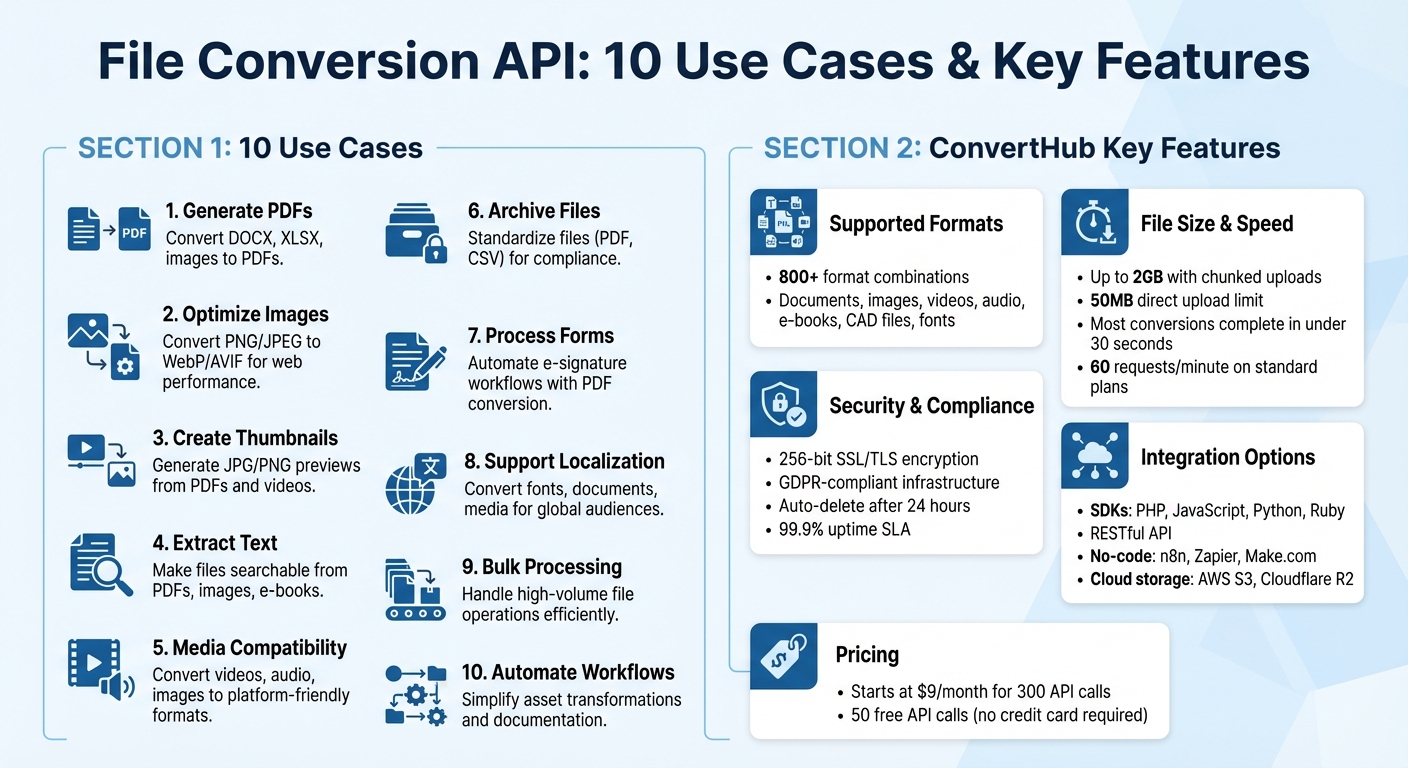
File Conversion API Use Cases and ConvertHub Features Overview
I found the ultimate file conversion API
sbb-itb-ba72479
1. Converting Documents to PDF for Sharing and Downloads
PDFs have become the go-to format for sharing documents across different platforms, devices, and operating systems. Whether you're distributing reports, invoices, contracts, or presentations, converting files to PDF ensures your document's layout and formatting stay intact.
Supported File Formats
A powerful file conversion API can handle a wide variety of document types, transforming them into polished PDFs. ConvertHub supports common office formats like DOC, DOCX, XLS, XLSX, PPT, and PPTX, alongside less typical ones like CSV, RTF, ODT, and ODS. It also accommodates image files (PNG, JPG, TIFF, BMP, SVG), e-books (EPUB, MOBI, AZW3), web content (HTML, Markdown), and technical formats like DXF, VSD, and Jupyter Notebooks (IPYNB).
Processing Speed and Batch Capabilities
ConvertHub is designed for speed, completing most document-to-PDF conversions in under 30 seconds. It employs asynchronous, job-based workflows, allowing multiple conversion requests to be processed simultaneously without slowing down other operations. Each job is assigned a unique ID, enabling you to check progress through polling or receive real-time updates via webhooks when files are ready.
For larger files - those exceeding the 50MB direct upload limit - the API supports URL-based conversions for files up to 2GB using chunked uploads. This feature is ideal for converting large presentation decks, spreadsheets with embedded media, or high-resolution design files. With parallel processing and caching, ConvertHub ensures that these tasks are completed efficiently while optimizing resource usage. This seamless approach lays the groundwork for smooth workflow integration, which is explored further in other use cases.
Integration Flexibility
Integrating ConvertHub's fast conversion capabilities into your existing workflows is simple. You can get started in just five minutes using the official PHP or JavaScript SDKs. For developers, the RESTful API adheres to standard HTTP conventions, making it easy to work with even without an SDK. If coding isn't your thing, ConvertHub also integrates with automation platforms like n8n, offering no-code solutions.
"ConvertHub API saved us hours of manual processing. The integration was easy and the format coverage is impressive."
– Petar Ivanov, petarivanov.tech
Direct integration with AWS S3 and Cloudflare R2 allows converted PDFs to be pushed directly to your preferred cloud storage. This eliminates the need for manual downloads and uploads, streamlining workflows where documents need to be stored or processed further in specific cloud buckets.
Security and Compliance Features
Security is a top priority with ConvertHub. All file transfers are encrypted using 256-bit SSL/TLS, and the platform operates on a GDPR-compliant infrastructure. Converted files are automatically deleted after 24 hours, but for extra peace of mind, you can use the DELETE /v2/jobs/{jobId}/destroy endpoint to immediately remove files and associated metadata after download.
"The API is well-documented, easy to integrate, and respects privacy. If you're looking for a file conversion API that just works, ConvertHub is a smart choice."
– Marko Denic, markodenic.tech
To protect your API keys, always store them in environment variables and use separate keys for development and production environments. This minimizes the risk of exposure if credentials are compromised. With a 99.9% uptime SLA, ConvertHub ensures your document conversion workflows remain dependable, even during high-demand periods.
2. Optimizing Images for Web Performance
Large, unoptimized images can significantly slow down websites. And since 53% of mobile users leave sites that take more than three seconds to load, optimizing images is crucial to keep visitors on your page. Converting high-resolution images into web-friendly formats like WebP or AVIF helps maintain speed and engagement. A file conversion API can automate this process, reducing the size of bulky PNGs and JPEGs while keeping visual quality intact.
Supported File Formats
ConvertHub supports a wide range of image formats, making it easy to optimize almost any type of file. It handles professional formats like PSD, AI, and RAW, as well as older formats such as PNG, BMP, TIFF, and JPEG. These can be converted into modern, efficient formats like WebP, AVIF, and SVG, which shrink file sizes without compromising quality. With coverage for 36 different image formats, ConvertHub simplifies optimizing everything from user-uploaded photos to intricate design assets.
Processing Speed and Batch Capabilities
ConvertHub uses an asynchronous, job-based system that processes multiple image conversions simultaneously, ensuring your application isn’t blocked. Each request is assigned a unique job ID, allowing progress tracking via webhooks instead of manual checks. Most conversions wrap up in under 30 seconds. For bulk tasks - like optimizing hundreds of product images for an online store - the API’s parallel processing handles the workload efficiently without overloading your servers. Files up to 50MB can be uploaded directly, while chunked uploads support larger assets up to 2GB. This streamlined approach makes it easy to incorporate image optimization into broader workflows.
Integration Flexibility
Getting started with ConvertHub is quick and straightforward. Official PHP and JavaScript SDKs are available, complete with a waitForCompletion() method to simplify asynchronous workflows. The RESTful API adheres to standard HTTP practices, so even developers without SDKs can easily integrate it. You can customize optimization settings, like quality (1-100), resolution, and target formats, directly in your API calls. Plus, compatibility with major cloud storage solutions ensures seamless storage of optimized images. For no-code users, ConvertHub integrates with platforms like n8n, and it offers Base64 encoding endpoints for serverless environments that struggle with multipart form data.
"With support for over 800 format pairs, this API covers every use case. Great documentation and it works perfectly."
– Csaba Kissi, csabakissi.com
Security and Compliance Features
ConvertHub ensures secure image transfers with 256-bit SSL/TLS encryption and operates on GDPR-compliant infrastructure with a strict no-logs policy. To enhance security, store API keys in environment variables and use separate keys for development and production environments. With a 99.9% uptime SLA, you can rely on ConvertHub to keep your workflows running smoothly, even during peak traffic or high-demand periods.
3. Creating Thumbnails from PDFs and Videos
Thumbnails make browsing content a breeze. Whether you're organizing a document library, a video platform, or an e-commerce site, these visual previews let users identify files without opening them. ConvertHub's API handles this by automatically generating thumbnails from a PDF's first page or a video's keyframe, converting them into JPG or PNG formats. This eliminates the need for manual screenshots, saving time while keeping your app running smoothly - just like its document and image conversion features.
Supported File Formats
ConvertHub supports a wide variety of file formats for thumbnail creation. For documents, it works with PDFs, DOCX, AI, PSD, and even DXF files. On the video side, supported formats include MP4, MOV, AVI, MKV, WEBM, FLV, and 3GP. Output options cover JPG, PNG, WEBP, BMP, GIF, TIFF, AVIF, and SVG.
You can customize thumbnails to fit your needs:
- Adjust dimensions (width and height between 10 and 500 pixels)
- Set resolution (DPI from 10 to 300)
- Choose specific pages, like the first page for a cover or a range like "5-8"
For videos, the API automatically selects keyframes to serve as thumbnails. This broad format compatibility makes ConvertHub adaptable for all kinds of media.
Processing Speed and Batch Capabilities
ConvertHub handles jobs asynchronously, assigning each a unique ID. It supports direct uploads up to 50MB and chunked uploads for files as large as 2GB, making it ideal for high-resolution video processing. Need to create thumbnails for a large video library? No problem - ConvertHub's parallel processing can handle multiple files simultaneously, ensuring your application stays efficient even during heavy workloads.
Integration Flexibility
Integrating thumbnail creation is as simple as with ConvertHub's other conversion tools. Using SDKs and a RESTful API, you can seamlessly integrate this feature into your workflow. Files can be submitted through:
- Multipart/form-data uploads
- Public URLs
- Base64 encoded strings (great for serverless setups)
ConvertHub's advanced SDKs also include smart caching, which retrieves results for repeated conversions, saving both time and API credits. For no-code users, ConvertHub integrates with platforms like n8n, Zapier, and Make.com. You can even automate storage by connecting directly to AWS S3 or Cloudflare R2, where thumbnails are sent to your cloud storage as soon as they're ready.
"ConvertHub API saved us hours of manual processing. The integration was easy and the format coverage is impressive."
– Petar Ivanov, petarivanov.tech
Security and Compliance Features
ConvertHub prioritizes security with 256-bit SSL/TLS encryption and operates on GDPR-compliant infrastructure. Files are automatically deleted after 24 hours, but if you need immediate cleanup, the DELETE /v2/jobs/{jobId}/destroy endpoint lets you permanently remove files and metadata after downloading the thumbnails.
For added security, store API keys in environment variables and use separate keys for development and production environments. With a 99.9% uptime SLA, ConvertHub ensures consistent performance, even during high-traffic periods. This robust security setup applies across all its conversion features, ensuring safe and efficient processing every time.
4. Extracting Text for Search and Indexing
Beyond media and document conversion, developers can use text extraction to improve searchability and indexing.
ConvertHub's API can pull text from PDFs, images, presentations, and e-books, turning previously hidden data into searchable content. By converting these formats into TXT or HTML files, it seamlessly integrates into broader search and indexing workflows. This feature complements ConvertHub's suite of tools, making it a versatile solution for content management.
Supported File Formats
ConvertHub supports a wide range of formats for text extraction:
- Documents: PDF, DOCX, DOC, RTF, ODT, and HTML
- Presentations: PPTX, PPT, ODP, and KEY
- Spreadsheets: XLSX, XLS, CSV, and ODS
- E-books: EPUB, MOBI, AZW3, and CHM
- Images: JPG, PNG, TIFF, BMP, and WEBP
Note: OCR for scanned documents is not available.
Processing Speed and Batch Capabilities
The API operates asynchronously, completing most extraction tasks in under 30 seconds. It supports simultaneous processing of multiple files, ensuring your application remains responsive during large-scale operations. File uploads up to 50MB can be handled directly, while URL-based chunked uploads allow for processing files as large as 2GB. This makes it ideal for indexing extensive libraries efficiently.
Integration Flexibility
ConvertHub's official SDKs for PHP, JavaScript, Python, and Ruby simplify integration into existing systems. Files can be uploaded using multipart/form-data, public URLs, or Base64 encoding for serverless setups. The webhook_url parameter enables automatic indexing as soon as a job is completed. For enterprise use, the API integrates directly with AWS S3 and Cloudflare R2, automatically sending extracted text to designated storage buckets. Smart caching ensures previously converted files are reused, saving both time and API credits when dealing with frequently accessed documents.
Security and Compliance Features
ConvertHub prioritizes security, with files automatically deleted after 24 hours. For immediate removal of sensitive data, the DELETE /v2/jobs/{jobId}/destroy endpoint ensures files and metadata are permanently erased. A 99.9% uptime SLA guarantees consistent performance, even during periods of high demand.
"The API is well-documented, easy to integrate, and respects privacy. If you're looking for a file conversion API that just works, ConvertHub is a smart choice."
– Marko Denic, markodenic.tech
5. Ensuring Multimedia Format Compatibility
Making multimedia content accessible across various devices is crucial for delivering a smooth user experience. Whether users are on smartphones, tablets, desktops, or smart TVs, each platform may demand different file formats. For instance, a video that works flawlessly on an iPhone might not play on an Android device or an older browser. By converting multimedia files into widely supported formats, you can sidestep these compatibility issues and ensure your content reaches everyone, no matter their device or platform.
Supported File Formats
The API simplifies multimedia management by supporting a wide range of conversions for images, audio, video, and e-books. For images, proprietary formats like AI, ARW, and PSD can be converted into web-friendly formats such as WebP, AVIF, JPG, and PNG. Audio conversions cover 16 formats, including popular ones like AAC, FLAC, MP3, and WAV. Video support extends to 23 formats, such as AVI, MKV, MOV, and MP4. E-books are also covered, transforming formats like AZW3, EPUB, and MOBI into PDF or TXT for broader accessibility.
| Category | Supported Formats | Common Target Formats |
|---|---|---|
| Images | AI, ARW, AVIF, BMP, HEIC, JPG, PNG, PSD, SVG, TIFF, WEBP | AVIF, JPG, PNG, WEBP, PDF |
| Audio | AAC, AIFF, ALAC, FLAC, M4A, MP3, OGG, OPUS, WAV, WMA | MP3, AAC, WAV, M4A |
| Video | AVI, FLV, MKV, MOV, MP4, MPEG, WEBM, WMV | MP4, WEBM, GIF, MOV |
| E-books | AZW3, EPUB, MOBI, PDB, CBR, CBZ | PDF, EPUB, MOBI, TXT |
This comprehensive format support ensures that files are processed efficiently and ready for use across different platforms.
Processing Speed and Batch Capabilities
The API uses asynchronous processing to handle multimedia files, which prevents timeouts during larger conversions. Each file is assigned a unique job ID and processed in parallel, with most tasks completing in seconds. Whether you're working with small files or high-definition media, the API supports direct and chunked uploads to accommodate all sizes. Smart caching further speeds things up by reusing results from identical conversions, saving both time and credits. Standard plans allow for up to 60 requests per minute, and webhook notifications eliminate the need for constant polling, streamlining the process even further.
Integration Flexibility
Integrating these capabilities into your workflow is simple, thanks to official SDKs for PHP, JavaScript, Python, and Ruby. Files can be uploaded using methods like multipart/form-data, public URLs, or Base64 encoding. Once converted, they can be automatically pushed to cloud storage platforms like AWS S3 or Cloudflare R2 through webhooks, ensuring real-time processing. The webhook_url parameter allows you to trigger automated workflows as soon as a job is completed, making the entire process seamless and efficient.
Security and Compliance Features
The platform prioritizes security with 256-bit SSL/TLS encryption for all data transfers. Files are automatically deleted after 24 hours, though users can opt for immediate deletion via the DELETE /v2/jobs/{jobId}/destroy endpoint. The service also adheres to GDPR compliance and guarantees a 99.9% uptime SLA, making it a reliable choice for critical applications. For optimal security, API keys should be stored in environment variables and rotated regularly to protect both development and production environments.
6. Archiving Files for Compliance in Regulated Industries
Industries such as healthcare, finance, and legal services operate under stringent rules for document retention and accessibility. To meet these requirements, converting files to formats like PDF, TIFF, or CSV ensures that records remain accessible and legally valid over time, regardless of changes in software or technology. ConvertHub simplifies this process by automating file standardization, making compliance easier for regulated industries.
Supported File Formats
The API supports over 800 format conversion pairs, making it easy to transform legacy and proprietary files into archival-friendly formats. Standardizing file formats reduces the risk of future accessibility issues. For example:
- Text documents like DOCX, ODT, and HTML can be converted to PDF for long-term storage.
- Images such as AI and EPS can be converted to TIFF or PDF for regulated storage needs.
- Data-heavy records are converted into CSV or TXT, ensuring they remain readable without requiring specialized software.
Processing Speed and Batch Capabilities
ConvertHub's API uses asynchronous and parallel processing to handle high-volume archival tasks with speed and efficiency. For large files - up to 2GB - chunked uploads ensure smooth and reliable transfers. Smart caching saves time and API credits by reusing results from identical tasks, while webhook notifications keep your system updated in real time. Once an archival job finishes, your system is instantly alerted, allowing the next step in the workflow to begin automatically.
Integration Flexibility
Official SDKs for PHP, JavaScript, Python, and Ruby make integration straightforward. Files can be uploaded via multipart/form-data, public URLs, or Base64 encoding, fitting seamlessly into your existing workflows. The API also integrates directly with AWS S3 and Cloudflare R2, automatically pushing converted files to secure storage locations. By configuring the webhook_url parameter, you can trigger actions like metadata indexing or compliance logging right after a conversion, creating a fully automated archival pipeline.
Security and Compliance Features
Data security is a top priority. All file transfers are secured with 256-bit SSL/TLS encryption, and files are automatically deleted after 24 hours. For highly sensitive data, the DELETE /v2/jobs/{jobId}/destroy endpoint allows immediate file removal after a successful transfer. The platform is GDPR-compliant and guarantees 99.9% uptime, ensuring uninterrupted operation for critical archival tasks. To further enhance security, API keys should be stored in environment variables and rotated regularly between development and production environments.
With ConvertHub's robust archival capabilities, regulated industries can ensure compliance while maintaining long-term data accessibility and security.
7. Processing Forms and E-Signature Workflows
E-signature platforms rely on PDF as the go-to format for finalizing documents, but the forms themselves often start as DOCX templates, HTML web forms, or even scanned images like JPGs and PNGs. A file conversion API bridges this gap by automatically turning these source formats into PDFs that are ready for signing. This automation eliminates manual export steps, speeding up the process. For example, when a Word-based contract template is updated or a customer submits a scanned application, the API quickly converts it into a standardized PDF, making it instantly ready for e-signature workflows. This ensures every form - whether digital or scanned - is processed consistently and efficiently.
Supported File Formats
ConvertHub handles a wide range of file formats, making it ideal for form-related tasks. It converts text-based files like DOCX, ODT, and HTML into PDFs with ease. For scanned paper forms, images in JPG or PNG can also be transformed into PDFs. Additionally, for data extraction needs, completed forms can be converted into XLSX or CSV formats, ready for automated entry into CRM or ERP systems. Whether your forms come as digital templates or snapshots of physical documents, ConvertHub ensures they’re processed smoothly.
Processing Speed and Batch Capabilities
The API is designed to handle high-volume e-signature workflows without slowing down your application. It uses asynchronous processing, so you can submit a document, receive a job ID, and get notified via webhook when the PDF is ready. For larger files, the API supports uploads up to 2GB using chunking. Standard documents are converted in a matter of seconds, ensuring quick turnaround times even for batch operations.
Integration Flexibility
Once the conversion is complete, integrating the API into your system is straightforward. Official SDKs for PHP, JavaScript, Python, and Ruby make setup fast - sometimes in as little as five minutes. Files can be submitted using multipart/form-data, public URLs, or Base64 encoding, which makes the API compatible with no-code platforms like Zapier and Make.com. Additionally, direct integration with storage solutions like AWS S3 and Cloudflare R2 allows signed documents to be automatically stored securely. You can even attach custom metadata (e.g., invoice_id, user_id) to keep track of audit trails.
Security and Compliance Features
Security is a top priority. All file transfers are protected with 256-bit SSL/TLS encryption, and the platform complies with GDPR standards while maintaining 99.9% uptime. Files are automatically deleted after 24 hours, but for sensitive legal documents, you can use the DELETE /v2/jobs/{jobId}/destroy endpoint to permanently remove files immediately after download. This ensures that personally identifiable information (PII) doesn’t remain on the servers longer than necessary. To maintain security best practices, API keys should be stored in environment variables and rotated regularly between development and production environments.
8. Supporting Internationalization for Localized Content
When creating software for a global audience, supporting multiple languages and regional formats is essential. A file conversion API like ConvertHub simplifies this process by converting documentation, media, and fonts into formats that work seamlessly across different regions. For instance, it can transform Markdown or DOCX files into PDFs or convert TTF fonts into WOFF2, ensuring content is displayed correctly no matter the market. This automation makes delivering localized content in the right format much easier. Plus, ConvertHub’s speed and security ensure a smooth experience for users worldwide.
Supported File Formats
ConvertHub supports over 800 format pairs, covering the most common needs for internationalization. For documentation, it converts Markdown, HTML, and DOCX files into formats like PDFs or SVGs, which are ready for web use. It also handles font conversions, including TTF, OTF, WOFF, and WOFF2, to accommodate diverse character sets.
Processing Speed and Batch Capabilities
Speed is a key feature of ConvertHub. It processes files in sub-second timeframes and supports batch conversion, which is perfect for large-scale localization projects. The API can handle up to 60 requests per minute on standard plans and supports files as large as 2GB. With asynchronous processing and webhooks, you’ll get notified as soon as your batch is ready - no need to keep checking manually.
Integration Flexibility
ConvertHub offers official SDKs for PHP, JavaScript, Python, and Ruby, making integration straightforward. The JavaScript SDK even includes full TypeScript support for a safer development process. For no-code solutions, the API integrates with n8n, and compatibility with Zapier and Make.com is on the way. You can also connect directly to AWS S3 or Cloudflare R2 for storing converted files in region-specific buckets. Additionally, Base64 encoding is available for serverless environments where traditional file uploads aren’t practical. These features allow you to build efficient localization workflows with ease.
Security and Compliance Features
Security is a top priority. All file transfers use 256-bit SSL/TLS encryption, and the platform complies with GDPR standards. To protect sensitive data, localized documents are automatically deleted after 24 hours - or sooner if you use the DELETE /v2/jobs/{jobId}/destroy endpoint. For added security, it’s recommended to store API keys in environment variables and rotate them regularly between development and production environments.
9. Handling Bulk Processing for Enterprise SaaS
When it comes to enterprise SaaS platforms, bulk processing plays a crucial role. These platforms often need to handle hundreds or even thousands of files at a time - whether that’s generating reports, converting uploaded files, or preparing documents. A file conversion API simplifies these processes by queuing tasks, assigning each one a unique Job ID, and sending webhook notifications once the job is done.
Supported File Formats
ConvertHub supports an impressive range of over 800 format pairs across major file types. This broad compatibility ensures your enterprise application can handle nearly any conversion need. Whether you’re converting DOCX to PDF, compressing videos for storage, or transforming CAD files into web-friendly formats, the API is up to the task. For bulk operations, paid users can process multiple files at once and download the results conveniently as a single ZIP archive.
Processing Speed and Batch Capabilities
Speed matters when you’re working with large-scale file operations. ConvertHub offers lightning-fast processing for many standard file types, running tasks in parallel for efficiency. The API handles up to 60 requests per minute on standard plans and supports files as large as 2GB through chunked uploads. Direct uploads are capped at 50MB, but for larger files, chunked uploads are the way to go. Additionally, if your files are already stored in the cloud, you can provide a URL directly to the API, allowing it to fetch the files and process them - saving valuable time during bulk operations.
Integration Flexibility
ConvertHub makes integration straightforward with official SDKs for PHP and JavaScript. The JavaScript SDK even includes full TypeScript support and works seamlessly with Node.js 18+, Deno, and Bun. For cloud-native setups, the API directly integrates with AWS S3 and Cloudflare R2, enabling automatic delivery of converted files to your storage buckets. If you’re looking for no-code options, n8n integration is available now, with support for Zapier and Make.com on the way. For serverless environments, Base64 encoding is an option for files up to 50MB. These integration options make it easy to align bulk operations with your existing workflows.
Security and Compliance Features
In enterprise settings, security is non-negotiable, especially for bulk file conversions. ConvertHub ensures secure file transfers with 256-bit SSL/TLS encryption and complies with GDPR standards. Files are automatically deleted after 24 hours, but you also have the option to delete them immediately after processing using the DELETE /v2/jobs/{jobId}/destroy endpoint. This flexibility is particularly valuable for industries with strict data retention policies. The platform guarantees a 99.9% uptime Enterprise SLA and uses Bearer tokens with environment-specific API keys for authentication. To avoid interruptions during large batch runs, you can track your credit usage through the /account endpoint. These security measures ensure that your enterprise operations remain both efficient and compliant.
10. Automating Developer Tooling Workflows
Developers often find themselves tied up with repetitive tasks - things like generating documentation, automating asset transformations in CI/CD pipelines, or normalizing user-uploaded media. A file conversion API can take these tasks off your plate by automating them directly within your existing tools. For instance, you can use it to convert Markdown files to PDFs for automated documentation or transform SVGs into PNGs during build processes. By tapping into ConvertHub's conversion capabilities, you can streamline these tasks and free up time for more critical work. This approach complements earlier examples of document and media conversions by focusing on making developer workflows more efficient.
Supported File Formats
ConvertHub supports over 800 format pairs across various categories like images, documents, audio, video, CAD files, and even fonts. This wide range ensures your automation workflows can handle just about any conversion need - from creating PDFs from HTML templates to optimizing user-uploaded media for the web. To make things even easier, the API includes a dedicated endpoint (GET /v2/formats) that lets you dynamically explore all supported conversion paths. This flexibility is key for tailoring automation to specific developer tasks.
Integration Flexibility
ConvertHub provides official SDKs for PHP and JavaScript. Its RESTful API also integrates smoothly with any language that supports HTTP requests, such as Python, Ruby, and Go. For developers working in CI/CD pipelines, this means seamless integration into existing workflows. Additionally, converted files can be sent directly to your preferred cloud storage solution. If you're using no-code platforms, ConvertHub supports n8n natively and offers Base64 endpoints for environments where traditional file uploads aren't feasible.
"ConvertHub API saved us hours of manual processing. The integration was easy and the format coverage is impressive." - Petar Ivanov, petarivanov.tech
These integration options make it simple to connect ConvertHub's tools with your CI/CD pipeline, ensuring a smooth and efficient automation process.
Processing Speed and Batch Capabilities
When it comes to automation, speed is everything. ConvertHub processes standard files in under one second and can handle batch operations through parallel conversions. Whether you're working with small files or larger ones, standard and chunked uploads cover a wide range of file sizes. To keep things running smoothly, webhooks provide real-time updates on job statuses, reducing API overhead and keeping your pipelines responsive.
Conclusion
File conversion APIs simplify development by eliminating the need for custom-built tools and cutting down on development time. Instead of juggling complex conversion engines for hundreds of formats, developers can integrate a specialized service and focus on building their core product. Whether you're working on document management systems, e-commerce platforms, or enterprise SaaS applications, these APIs deliver the infrastructure needed to handle conversions reliably - even at scale.
Some standout benefits include support for over 800 format pairs, asynchronous processing, and top-notch security with 256-bit SSL encryption and GDPR compliance. Additional features like webhook notifications, chunked uploads for files up to 2GB, and seamless integration with cloud storage platforms such as AWS S3 make these tools a natural fit for modern development workflows. These capabilities allow developers to manage file conversions efficiently across various applications, from document processing to media management and e-commerce.
For those looking to optimize file conversion workflows, ConvertHub offers a great starting point. You can test the service with 50 free API calls - no credit card required. With a 99.9% uptime SLA and plans starting at $9.00/month for 300 credits, the platform is designed to scale alongside your application.
Dive into the API documentation, experiment with the free tier, and take advantage of features like webhooks for asynchronous conversions. Remember to store API keys securely in environment variables, use chunked uploads for larger files, and keep an eye on your credit usage via the account endpoint to ensure uninterrupted service.
FAQs
How do I choose between webhooks and polling for job status?
When deciding between webhooks and polling, it all comes down to your system's requirements and how efficiently you want to manage resources.
Webhooks are great if you're looking to minimize resource use and reduce delays. They work by automatically notifying your app as soon as a task is completed - no constant checking required.
On the other hand, polling is easier to set up but involves repeatedly checking the status, which can lead to higher resource consumption. It's a suitable option when webhooks aren't available or when instant updates aren't a priority for your application.
What’s the best way to handle files over 50MB in the API?
Chunked uploads are the go-to solution for handling files larger than 50MB. This approach divides a large file into smaller, manageable pieces, making the upload process more reliable and efficient. By using this method, you can avoid interruptions or failures, ensuring smooth handling of large file sizes.
Can I extract text from scanned PDFs or images with ConvertHub?
ConvertHub includes an OCR (Optical Character Recognition) feature that lets you extract text from scanned PDFs or image files. However, keep in mind that OCR isn't supported for every file type. It's a good idea to double-check file compatibility before starting your conversion.